Friday, August 22, 2008

Flash Forward

These guys showed off their API at flash forward day 2:

http://labs.ideo.com/

Thursday, August 21, 2008

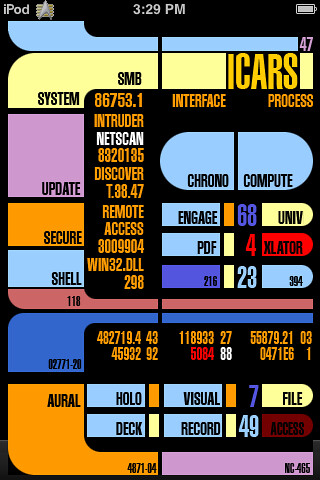
iPhone GUI PSD

http://www.teehanlax.com/blog/?p=447

Endless designy fun.

Tuesday, August 19, 2008

Emotion and Flow

We create software and websites to display and represent information to people. That information could be anything; a company’s product list, pictures of your vacation, or an instant message from a friend. At this moment, there’s more information available to you than at any other time in history.

All this information has a lot of positive effects, but it also creates challenges. “What information consumes is rather obvious; it consumes the attention of its recipients … a wealth of information creates a poverty of attention” (Simon 1971). When attention becomes a scarce resource, it’s important to invest it wisely. Information architects and designers play a critical role in ensuring the products they design provide users’ with a return on their investment of attention.

Monday, August 18, 2008

Flash Forward

Friend of mine will be blogging from Flash Foward. If curious about the conference please check out his blog.

Beauty

http://www.smashingmagazine.com/2008/08/17/10-futuristic-user-interfaces/

Friday, August 15, 2008

5 Useful Coding Solutions For Designers and Developers

There's a great article on Smashing Magazine that can really inspire you when it comes to designing a multi-touch interface.

Often creative and truly remarkable design solutions remain unknown because we, designers, simply overlook them. Being busy with our own projects, we sometimes try to grasp the intuition behind (probably) complex and cluttered code of other designers to understand how they manage to implement particular design ideas. In fact, by just observing the code of other developers we can learn a lot from them; we can find interesting ideas and improve the quality of our work.

The article goes on to talk about five really clever interfaces, maybe they can inspire you.

Thursday, August 14, 2008

Sound Off!

#1 Newbie mistake: Sound

Sound needs to be subtle, non-pervasive and elegant. If you blast rock or annoying voices upon every click, your user is going to get turned off in a big way. Unless you've made a rock-band game, keep the hard rock out.

Listen to your own music, again...and again...and again. If you can't stand it then people not in love with it REALLY won't love it. If after 2 hours of music you can still stand a sound, go for it.

No chimes, jingles or invasive sounds either! Keep it simple and subtle.

Think About the Timing!

Time and people's perceptions of it is a growing field in digital design. When you think ahead are you thinking of how people will perceive the pace and timing of your project? Sure for menu-driven content it's fairly straight forward but what about when your giant-file multi-touch apps start going live on the web? TIMING.

Here's some advice
  1. Load behind the scenes - Whenever possible pre-load work behind the scenes. Actionscript is great for this. Don't just load assets on the fly, make them appear quicker with preloading.

  2. Divert attention - People aren't idiots but they aren't all savants either. If you give someone something quirky or fun to look at while loading then you'll improve the general feel of your app. A small animation of loading is better than none at all.

  3. Preemptive start - An old-hat trick for NES developers was a "Start" menu. The start menu allowed all sorts of pre-caching to happen behind the scenes. It slows the user down while preventing them from feeling like the app is stalling.

  4. Load indicator - Whenever possible tell people how far along their load is. This is a real life-saver when it comes to programs that take over 10 seconds to load. Don't bother for apps under 10 seconds though.

  5. Don't interrupt! Do the bulk of loading up-front. People are MUCH more forgiving if you load before hand than in the middle of their session!

Tuesday, August 12, 2008

Actionscripted!

ActionScript 3.0 is a programming language from Adobe that people have been using in conjunction with Touchlib to make multi-touch programs.

I've recently embarked in basic research to learn it to begin development.  My first step before I even get into the touch stuff is to learn the basics.  However I've been doing heavy research into the subject and happen to work with people who do very advanced Actionscripting for big-name clients.  I asked them what resources they would recommend for someone trying to break in.  I thought I'd share.

Step 1: Actionscript 3.0 for Adobe Flash CS3 Professional
This book covers the essentials of Actionscripting.  This is where you want to start.  Todd Perkins does a good job of presenting real functional code in an easy-to-read format. 

This book te
aches the foundations of Actionscript including events, functions, packages and classes.

The CD included with the book contains source files to ease the learning process as well as videos explaining key concepts.  $50 on Amazon.


Step 2: Foundations of Actionscript Animation

Foundations is a great book to learn the mathematics behind Actionscript animation.  It contains many code examples of how math can be used to animate in AS3.  Foundations covers everything from simple Sprite classes to advanced interactive techniques.

It should be noted however that this book was written during what seems to be an early period of AS3.  Many of the examples are flawed and should not be taken at face value.  Read it to learn about the math than how to actually program in AS3.  The website features code from the book that...isn't even in the book...with no explanation.  Retail $40.


How to Cheat in Flash CS3
How to Cheat is an excellent guide to animation in Flash.  This is less Actionscript-oriented and more geared towards actual animation.

Chris delves into several techniques for creating your own animated character but also stretches into some handy techniques for any developer such as setting up your preferences for maximum efficiency.


If you have ever stared at a blank stage wondering how to make your ideas into reality, this is how its done. I consider each example a best practice of how to use Flash CS Professional.
Justin Everett-Church, Sr. Product Manager Flash Player, Adobe Systems

Monday, August 11, 2008

Numb Face

Face numb from lying on keyboard attempting to learn actionscripting....

/zombie

Sunday, August 10, 2008

Mark van Wijnen Interview: Part 2


What were some hurdles in the project and how did you overcome them?

Building the multi-touch hardware was the biggest hurdle, the only thing I built before was an IKEA closet. This also shows that everyone can build their own multi-touch table if they want to, as long as they don't quit easily.

I overcame it by reading the How To tutorials, by reading forums, and just by trying it out, buy the equipment and just do it. I also had some problems using the communication tool the NUIGroup uses, so I overcame that by building my own. Other then that the only problem was time - unless you invent a time machine, you can't overcome that.

If you could impart some words of wisdom to people just getting into multi-touch development, what would you share?
Just do it! If you are passioned about it and you like building your very own computer table, you should just do it. There are a lot of games and applications for it already, you will enjoy it.

What do you think of the multi-touch community? How could it improve?
Thanks to the NUIGroup it's great, your topics don't get censored, everyone is very helpful and try to contribute to the community, so it's great.

As a developer, where do you see multi-touch in 5 years? 10?
Well multi-touch would just be as normal as single-touch screens. Apple already uses the technology in it's phones (iPhone) and ipods (iPod Touch) and Microsoft will soon follow with their new operating system [Windows 7] and it's Surface, more companies like Dell will follow. In five years, everyone will be able to affort and use multi-touch. The technology used today will still be very interesting as it allows for creative use, like integrating it in shopping windows, etc.

What do you do when Catan is finished?
A product is never finished, there are always things to improve and make it more fun. There are still so many options I like to integrate in this game and a lot of things that need another approach to make it better. So if I had the chance and the time I would definitely work on that.

Unfortunately I don't have that luxury. So now that the beta is finished, I need to finish my thesis and after that I will take a long vacation to a tropical place. When I get back I am curious about developing for the iPhone 3G, due the fact that it has a lot of technology in it which you can use, GPS, WiFi, (Multi)Touch, Accelerator, Camera, etc.

Saturday, August 9, 2008

Mark van Wijnen Interview: Part 1


Who are you? What do you do? What are your capabilities? What is your motivation to pursue multi-touch?

My name is Mark van Wijnen, 23 years old, and I live in Holland. I am currently doing my masters in arts and technology at the HKU in Utrecht where I am being trained to become a game designer - I'm a designer and a programmer.

My motivation for pursuing the multi-touch technology is mainly my graduation project, where I wanted to prove that you can bring board games to a computer with the same amount of social interaction and fun, or even more fun. I believe computers can really enhance board games.

What's the hardest part of multi-touch, what parts do you think need the most improvement in terms of tools for developers?
Regarding to games, the hardest part of multi-touch is hiding information. When it comes to parts that need most improvement, that's really hard to say.

Off the top of my head I would say that it would be great if Touchlib could recognize one finger from another finger and if two fingers come close to each other that would still be recognized as two fingers. As for the communication library between Touchlib and Flash I would make it more accesable and much more userfriendly. Other then that it's pretty solid.

Tell us a little bit about your Settlers game. What types of multi-touch functionality does it have?
Currently the Settlers game is just a copy of the original traditional board game: The Settlers of Catan by Klaus Teuber. I don't allow myself to copy the dice, cards, pawns etc. - I used different methods to work around them. Every player operates his or her control panel by just a single touch. Because they can all use it simultaneously it becomes multi-touch.

How did you program it? What were your objectives?
I coded the game in Actionscript 3 which comes with Adobe Flash CS3 and used my own Touch!Library for the communication between OSC and FLOSC, which is also coded in AS3. My objects were to design a simple tool so anyone could create multi-touch applications fast. My main objective was to see what the board game experience would look like on a multi-touch device and how a computer could digitally enhance it.

How did you design it? Can you take us through the process?
You always start with an idea. I wanted to experience board games on a multi-touch and therefor I could have chosen any traditional board game. The reason I choose The Settlers of Catan was because I wanted to avoid using any external objects. Catan seemed to have a lot of typical board game objects like dice, cards, pawns, etc. this would mean I would need to find other solutions for them. So I started with creating a framework for the game that holds every action you can do in the game in functions.

For example the functions giveResourceToPlayer() or takeResourceFromPlayer(). A framework is very handy because there are so many ways how players could interact with your game, if you would change one thing because it didn't seem to work, you don't have to change the whole code. After the framework was done, I concentrated on the design and interaction. I'm not an artist and so I was very limited to the graphical part. It's very important to have an overview of your game in mind, how players will overal interact with your game. I came up with the individual control panels, where everyone has their own panel to see their resources and to perform their actions.

After that had been decided I needed to build all the features you can do in the game. It's VERY important to TEST!! When a version is stable enough you should definitely test it out with family, friends or other people who are willing to help out, this way you get new feedback and you are able to quickly see what works, what doesn't work, and more importantly you can see if your design is logical enough.

Can the player navigate and operate the control panel without you telling them where to touch? Bugs you may come across, any feedback you may get, you put that in the game and test again. If the game designer and the testing group are happy you can release it.

To learn more about Mark or his Settlers project please visit the Crystal Minds blog.

Friday, August 8, 2008

Catan

Check out Crystal Minds blog.  The creator, Mark, is making a multi-touch settlers of catan game.
For a while now I’ve been working on a multi-touch edition of the board game The Settlers of Catan which is originaly designed by Klaus Teuber. I am almost done with the first beta version and since my current FTIR setup isn’t as stable as I would like, I need beta testers to help me test it out. Are there any volunteers?
Check back Saturday and Sunday for the two-part interview with Mark about the project!

Thursday, August 7, 2008

Touch Illusions

Video of multi-touch stage illusion for reference.

I was looking at that video and how it could apply to magic shows or theatrical plays.  What limits such creativity?  Imagine if he was moving along a cast of cartoon critters instead of pictures.  Imagine if stage wizards could create vivid illusions on-stage.

Considering the insurance costs of pyrotechnics these days this may just be a growing marketing that's yet to be tapped.

Wednesday, August 6, 2008

Sci-Fi Interfaces

While I'm on the topic today:
http://www.youtube.com/user/ambutz

An interesting watch.

Why Star Trek Design Sucks

Time to roll up our sleeves and get nerdy. I'm not a Trekkie (though I watched quite a bit of the Next Generation) but I do have a fetish for strange interfaces. One of the first things that came to mind when I learned about touch screens becoming more commonplace was Star Trek. I'm marking this post as special because I forsee that as soon as joe-user begins creating interfaces we're going to see something somewhere that looks like this:


And on that day I will do two things.
  • I will cry.
  • I will link this post.
The Star Trek interface is not only bad, it also visually atrocious. For all that is good and holy there is a standardization board . Go to that site, please. On there? Good. Now without reading the words tell me what is and is not a link. Chances are you're very wrong.  Now I think it's an awesome amount of dedication to a project and for what it is they've done a great job programming but the nature of the interface itself is terrible.

This was going to be a short post but to hell with it, let's dive in. I figure this can help to teach you what not to do.

I DON'T NEED TO SEE MY COMPUTER PROCESSING INFORMATION
Is their a design purpose behind showing a computer's data? Are people from the future super-duper hex-code readers? No? Yank it.

I DON'T NEED SIX SHADES OF EVERYTHING
There are at least 10 individual colors on that page. The color (besides RED ALERT) does not seem to have any particular designation. Honestly I haven't bothered going through the standards doc but if I have to learn what 20 shades of color mean then there's something SERIOUSLY wrong with the design.

DO NOT CLUTTER THE PAGE
There is no "white space." We were raised in school to think that space was evil. It meant you did not fully answer questions or did not use everything inch of what you could have. But in the design world white space can be great in helping people figure out where they should be going. This site does not provide that opportunity.

SAME FONT
Everything is the same font and ALL CAPS. It's incredibly hard to differentiate one word from another because all the heights are even and the human eye does not read like that.

BAD SHAPES
The shapes do not denote what is interactive and what is not. They're just there to be futuristic. Design must be both functional and beautiful - this is neither.

Tuesday, August 5, 2008

Getting Started: Brief and Research

Before you start any project you should always write out a brief and do your research. A brief is just a series of short answers that speak to what the project is going to be about. You can use the questions below as a baseline.

What am I doing?
Creating a plus sign button that, when clicked turns into a minus sign. Clicking again will bring it back.

Why am I doing it?
Eventually I want to create a series of easy-access menus and need a simple to understand icon to expand or contract these menus.

What is the end product?
A rounded button in flash which switches between + and - upon click. Asset is a .fla files and a .swf.

What factors do i need to consider?
How do I want to transition the animation. Is it a quick switch or something else. Vector or Raster art.

What is the artistic style/mood of the piece?
Generic - can fit many styles.

Who can it benefit?
Myself. People making menus.

Next you do the research. Research is primarily to prime the pump of your subconscious. The subconscious can be thought of as your conscious mind on steroids. You can't control it but it "leaks" information to you. Doing research and then leaving something alone for a while can be a great boon - I always leave myself several days between an idea and executing it - this allows my mind to do its work. Rarely fails.

Woah

So pretty.

Sunday, August 3, 2008

Animation Man

Developers are not designers and designers are not developers. I've learned this over the years. There are few people talented in both the development (left brain mathematical) and the design (right brain creative) parts of a project. I've recently been talking to a few of the touchlib people about their progress and why they feel they've been going slow.

  1. They're new to programming and while there are resources there is no comprehensive guide.

  2. They feel that while the nui forums provide support there's no collaborative effort to help with the little things.

  3. They can program but they have no idea what goes into practical design and get frustrated.

Now any of these problems is solvable. 1) A writer actually building a step-by-step guide. 2) A richer community experience perhaps utilizing social networking or ventrillo. 3) Designers. Not to knock nui (I love it) but there are 7 or 8 development forums but none for design!

Designers are important to the community because we know how the mechanisms of animation work. For example if you wanted to drop an icon to the floor though a fake gravity design most developers do this:

It drops down just fine, in a straight line.


But what they don't realize is that to be more fun and interactive you should actually make it:


Bounce!

I suggest before beginning development on anything new you work out a design document and prototypes. But more on that next week!

Saturday, August 2, 2008

Iconography

Icons! Icons! Amazing little things. Icons are a HUGE part of interface design. Most companies create icons by boiling down their biz into a slick-looking image.


If you truly intend to go all the way with UI design it will greatly help to know how to make these little buggers. Don't waste your time on research! I've done it for you!

If I can find the video online the next story should be about how you can bring these little buggers to life!

Friday, August 1, 2008

Elements of Influence: Storytelling

Tablet Designers

Occurance:
  1. There are a lot of people clamoring for their own tablet.
  2. There are people who know how to build them.
  3. The elements of these tablets can be customized to some extent to make them look cool.
By the laws of supply and demand someone could make a hefty profit by building custom rigs with artistic designs and such.

Elements of Influence: The Call-to-Action

Here's some brain food:

When advertising first rolled out it was extremely effective. "What is this?" The people would say, looking at an ad for shaving cream, "I do need a shave." Eventually people got used to the ads and learned to ignore them. All the advertisers in the world collectively scratched their heads and said, "By jove! This isn't working as well any more!" So they busted their noggins, looking at what worked and what didn't until they noticed a trend - ads that ended with some action the viewer could take had better results.

"DOWNLOAD NOW"
"See your doctor to learn more about adnaseumXD"
"See your grocer's freezer"
etc, etc, etc...

From this they created the term Call-to-Action or CTA. That's why most banner ads you see have a button you can click or an action you can take at the end. It's just more effective.

"How does this relate to my multi-touch design?" you say. Well the simple fact is that if you assume the user will do something but you give them nothing to do then you have failed. I have seen again and again programs that tell you to do something but give you no explanation as to HOW.

“But my users are smart!” You declare, finger again waggling in the air. No, no they really aren’t. If your design isn’t god-like-intuitive then people just aren’t going to get it. People want to know how to do things and once they know don’t want to be explained to every time, they’re very very unreasonable that way.

Think of working in a company that builds tablets. The first few tablets you build you’d want instructions. After that you’d want a reference, then you’d just ignore the whole thing and build’m yourself.

Imagine a library without a reference system.

When programming something in touch that isn’t obviously obvious it’s best to give users the option to learn. If you don't tell users the where and how of what they're looking for then your design fails.

Thursday, July 31, 2008

Elements of Influence: The User Experience

A lot of people in the Information Architecture and Analytics fields talk about the term user experience. What this basically means is engineering how users feel when they use a particular object - planning ease-of-use, intuition and fun into the design of things.

Now a lot of people have a lot of opinions as to how this works but none of them really matter right now. You see a web interface is not a touch interface and is certainly not a multi-touch interface. Yes, there are certain insights we can gleen from the usability experts and information architects that have come before but the experience users get from a multi-touch interface is largely right now undefined, unrefined and untested. It's not a technology accessible to joe common user (and likely won't be for another year or so) so that means opinions have yet to be formed on how it should be used.

I'm all for showmanship - the pretty lights and shiny baubles of current touch interfaces are revolutionary but will eventually grow to be "old hat." Eventually people will focus away from the fact that we can interface (light shows) with a computer this way and begin to focus on how we do it.

The key to this is to get into the head of the common person. What are they using your program for? What do they expect? What can they learn? What will amaze them? What will turn them off to the experience and never come back? What's boring? Those are the questions that will drive people to your applications. These subjects (which I hope to cover in time) are:
  • Typography - How font affects the user
  • Gestures - Why defining gestures to make sense is important
  • Layout - How to build layouts that people can understand
  • Color - How color affects the user
  • Transition - The importance of transitions
  • Information Access Channels - How people look for and access information
  • Design Stories - Stories are told to be linked in to your life - it's called critical thinking. Somtimes stories of design from other fields can inspire you in yours. It's not about solid information it's about critical thinking.
So get those brain juices flowing. Before you start a project figure out the nitty-gritty.

Low Self-Esteem

My life is a constant fluction of low and high self-esteem. It's an odd paradigm really where I believe I can do anything only to realize upon begining to do it that it is too easy to do and, in the end, a worthless idea. I'm happy to inform you that this problem is quickly remedied by half a ruffie chased by three liters of gin.

Now I jest except for the fact that often times I look at the amazing shit other people are doing with talents I just don't have and begin to realize a sad fact: I'll just never be that good. Really? REALLY. But the simple fact is that for one to be successful in any community you don't have to be particularly good at what everyone else is good at, you just need to find a particular niche that others can respect and burrow in like a tick.

Therefore I'm proud to announce that this little experience you are having right now will not be about me designing awesome shit for you to gaggle at but instead will focus on:
  • The community
  • The awesome shit other people are doing
  • Design theory
  • How to Guides

Frankly that world does not need another great developer - it has plenty. It needs someone to talk about them.

Wednesday, July 30, 2008

Life Mocks Satire


....


...

Community

So I've been lurking out in the nuigroup forums, pouring over information as I tend to upon first inspection and I have come to two conclusions:

1) I don't have a damn clue as to how any of this works since I'm not a programmer.

2) They have something damn special going on over there community wise.

Now in the real world I am in digital advertising (big firm with management duties) and have done some good PR work (client on Good Morning America/Early Show). This means I sold my soul a long time ago.

I try to earn it back a bit by supporting communities. This has ranged back from the days of warcraft 2 guilds all the way forward to getting in on Seth Godin's new tribes program. I consider community development my strongest suite. However I'm amazed at the cohesiveness of the community as it stands. It's the uncooked raw pioneer spirit that you can't find anymore. It typically doesn't last long but it's wonderful while it does.

If you're not familiar with nui go here.

All the people on their are amazing.
  1. Extremely Friendly
  2. Intelligent Programmers
  3. Pioneers
Yet it's kind of sad because I know what typically happens and I've seen it before. Here's how it usually goes down.

Microsoft and Apple and godknowswhomelse will have different nuanced standards that will divide people up and start carving the community. The original creators of these awesome tech bits people are developing will get awefully frustrated as their work will start getting used by people who aren't in it for the love of the medium but for the love of the money. I don't mean to sound like a crazy SOB with an "end of the world" sign but that's how it goes down. There are two remedy's for NUI's survival and one long shot.

  1. NUI Picks A Side - Right now NUI has something corporate America wants: developers. Look at the utter bolloxing failure of the PS3. Shiny awesome hardware but not enough talented developers making games for it - utter failure. NUI can pick a side and bring a chunk of the community with it, get a few pats of the head and publicity angles from Microdellplewhoever and probably sustain on for quite some time.
  2. NUI Rebrands as community hub - Nui can diversify and take up supporting the multi-touch community as a whole, realizing it probably won't be able to keep up with the giants who will all want to develop a piece of the pie. This will keep nui in the game as a player and would probably attract a lot of interested companies to partner with it.
  3. The Linux Solution- The third option is NUI becomes the linux of the multi-touch world and cater touchlib to all platforms. This will probably work at first until Microsoft pushes a button that says, "No thx bye now." Open source communities tend to attract the most hardcore of people but become some of the least successful/profitable (see linux's marketshare). Unless they rebrand as also a standards commitee and gather the big talking heads under one roof with promises of community <3,>

My point is, nui/touchlib has a commodity, community. It's a community of smart people these other companies want/will want to recruit. And that may not last long considering the $$$ corporate America can pour in. Nui needs to foster community and focus a direction as well as get some sort of publicity campaign going to up their clout and attract the attention of the major companies.


If community isn't coming to big business, big business will come to the community.

For now, enjoy this little spitfire photoshopped image of me in 20 or someodd years.


How to Build A MultiTouch Display

Here's some starting points:
  • http://www.instructables.com/id/Interactive-Multitouch-Display/
  • http://blog.makezine.com/archive/2007/06/interactive_multitouch_di.html
  • http://www.technologyreview.com/read_article.aspx?ch=specialsections&sc=futurebiz&id=20703&a=f
  • http://www.nuigroup.com/touchlib/
The terrible problem currently with the dell latitude seems to be a sketchy compatability with touchlib. Disparity between touch libraries hopefully will not become a growing problem...

Know of any other good resources? Let me know.

Tuesday, July 29, 2008

Collaborative Models: Turn-based Collaboration


The second model for us to take a look at is more geared towards gaming than any other - Rules Guided Collaboration. In this model each person takes a turn at the screen. This is a great system for a game like chess where only one player takes action at a time.

Limitations
This is the polar opposite of the software guided collaboration system. It only works based on turns or simple actions. This is guided by rules so while multiple-gestures can be used (finger-spread, double tap, ect) only one person can theoretically be doing them at a time. The strongest limitation is the lack of true collaboration.

Recommendations
Great for turn-based games.

Monday, July 28, 2008

Collaborative Models: Software Guided Collaboration

Your rig, no matter how pimped does not have two mice. It does not have two keyboards. It's just not very damn feasble space-wise to have a true collaborative environment.

But what we've been seeing from early developers is an eagerness to create true collaboration using these interfaces. Annoying music warning:

Multi-Touch Pong


The primary problem with true collaboration is going to be how the computer understands who is doing what. Let's say there's two people who want to use a tablet to edit an image. That's great but what if one of you wants to paint in red while the other paints green? How is the interface going to know?

That's the challenge.

The first model we'll look at is called software guided collaboration model. Why? Because the software is determining which parts of the environment are affected by which tools. This way two people can effect the same environment.

But this goes beyond pong where each half is its own piece and there are no connections. Let me give you an idea of what I mean...


Amazing stuff, huh? Were I a powerful company (like Adobe) I'd start patenting this stuff now (like they tried to do with layers).

Limitations
The primary limitation of this model is that it reduces screensize by half making it much harder to get work done - everything has to shrink.

Recommendations
This model is great for games that need fast reaction times. I'd also recommend it for collaborative software with complex menu options.

Community Infancy

Communities are very cool orgasnisms. I've spent far too much time looking into how they evolve and what makes them tick. Right now the community is in it's infancy, there are only a few community members and they're all doing their own thing. It's not selfish, it's just publicity.

These people and institutions aren't trying to share or advance the medium - they're trying to show off. But the truth is they haven't figured this medium out yet - none of us have. We all have these different pieces and parts but none of us have put them together yet. It's great.

If the medium is going to evolve then some smart people are going to need to get together. Standards need to set and people need to get together to work out best practices. For the group to evolve it can't be just individuals doing their own thing. When the higher-minds don't get together we have the disparities we have with current browser standards.

Sunday, July 27, 2008

Six Basic Rules of Multi-Touch Design

Let's set some ground rules this month. I'm all for charging head-first into something but I like to know what it is I'm getting in to first - so should you. Here's some common-sense rules:
  1. Follows tested guidelines to help the user have a great experience.
  2. Knows when to break the rules to amaze and surprise people.
  3. Creates a brand experience.
  4. Common users will find fun.
  5. Is intuitive. USERS SHOULDN'T NEED A MANUAL TO "GET IT."
  6. The design should not interupt content, it should make it MORE accessible.
Designers are great people but a lot of the time they are design-centered rather than functionality-centered. When designing an interface my best bit of advice is to get the users to the core of the experience as quickly as possible. You can create all the shiny functionality you want but don't bother unless it's actually helpful to the user.

Friday, July 25, 2008

A Very Brief history

Revolution, that's what I'd like to talk to you about. Specifically the revolution that's about to happen to your home computers. It's wonderful, it's scary, it's multitouch interfaces.

"But wait!" you say, finger pointing straight up in the air with zesty exclaimation, "I think you're another pedantic blogger with self-righteous intent and a finger up his ass.
"Yes." I shall reply, yes I am.

Let's go back in time, shall we, a time to computerized punching cards.

We'd toss these buggers into giant computers and what would be spewed out would be the simplest of calculations. "PERFECT!" the scientists cried. But not very practical.

Then came the revolution of the keyboard, a wonderful device that allowed us to actually not have to use giant cards to input information. "Perfect!" cried the early programmers. But not very practical.

Then the mouse came on to the scene. We could actually interact with the stuff in the screen! WOW! "Perfect!" now yell the common men and women of the world. Functional but not very practical.

I believe the future to be in touch. Let's see if I'm right.

Who is Scrabble?

My name is Jim Bruno, I'm a digital producer and quality engineer for a major advertising agency. In my spare time I lead a normal life as one would expect grinding through the days and nights as most people would - bored to tears.

Frankly I've begun to find this rather boring and decided to take up a cause: multitouch interface design. I intend to be completely blunt and honest when it comes to these posts - I don't want to waste your time with bullshit and quotas like some other blogs I've read.

I'm coming at this completely green - I have absolutely no experience with this sort of thing and if you want to bail-ship now I can't really say I blame you. I intend to treat you like idiots because, frankly, that is what I am myself.

To give you an idea of where I'm starting from here's my skillsets:
- 12 Years on the Net
- BA in Communications (Advertising)
- 1 Year in the Digital industry as a producer
- Photoshop/Dreamweaver/Flash

So obviously I'm not starting from a naive point but one that could be improved. I love design and I love the idea of multi-touch. I'm very eager to see where this will go and I hope we can take the journey together.